
Creating a Python Config Object using AWS Secrets Manager

Stewart Moreland
Whether you're developing your application to use Lambda functions, ECS or EKS containers, SageMaker Notebooks, or EC2 instances, the proper configuration management can make all the difference in the world in developer ergonomics, application security, and secrets management.
In this guide, we'll walk through how to create a Python configuration class using AWS Secrets Manager and Python object inheritance. We'll also demonstrate the use of our configuration object using AWS Lambda functions and the AWS Serverless Application Model CLI.
Prerequisites
Before starting this guide, ensure you have:
- An AWS Account
- AWS CLI installed and configured
- AWS SAM CLI installed
- Docker Desktop
- AWS Python SDK (Boto3)
- Some experience with Python Development
Architecture
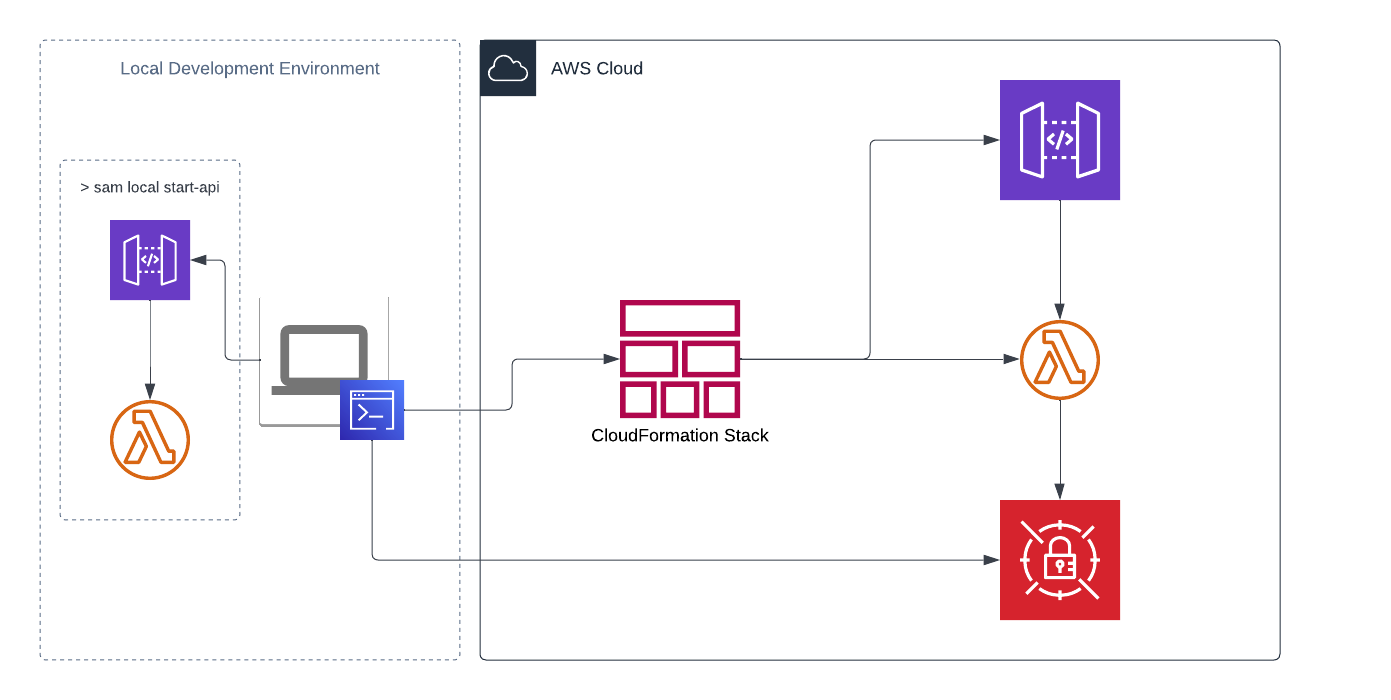
Guide
Create a Secret
In your AWS account, create a new secret in AWS Secrets Manager. We'll use a generic key/value secret for this example but any secret type could be applied so long as we use the proper Boto3 method to retrieve it.
aws secretsmanager create-secret \--name hello-world/stage \--secret-string '{"DB_ENDPOINT": "mydb.example.com","DB_USERNAME": "mydbuser", "DB_PASSWORD": "supersecret"}'
This command creates a hello-world/stage secret and adds three key/value pairs for DB_ENDPOINT, DB_USERNAME, and DB_PASSWORD. Now that we have a secret created, let's create an app that uses it.
Generate a Serverless App
SAM CLI offers boilerplate templates so we can get started developing quickly. To begin, run the following command in your preferred terminal to create a basic hello-world serverless application with Lambda and API Gateway.
sam init --name sam-app --runtime python3.9 --app-template hello-world --no-tracing
Using this command, SAM CLI has created a new directory with the name of our application. In this case, sam-app. Open this directory in your favorite integrated development environment (IDE).
SAM CLI generates a structured project with separate directories for your Lambda functions, events for testing, and CloudFormation templates.
Project Structure
sam-app│ __init__.py│ .gitignore│ README.md│ template.yaml│└───events│ │ event.json│└───hello_world│ __init__.py│ app.py│ requirements.txt
Configure CloudFormation Template
Start by opening template.yaml and add two new parameters directly under the template description.
Parameters:Environment:Type: StringDefault: localSecretName:Type: StringDefault: ""
We'll use the Environment parameter to tell us which config class we want to implement, and the SecretName to define which AWS Secrets Manager secret we want to use to source our credentials.
Empty String Default
Notice how we've passed an empty string to the SecretName parameter. We do
this so that when invoking the function locally, we don't pass a null value to
the environment variable we create.
IAM Role Configuration
It's important for our function to have the appropriate IAM policy, granting it permission to use our newly created secret. Let's add the appropriate IAM role & policy as CloudFormation resources to the template.yaml.
LambdaIAMExecutionRole:Type: AWS::IAM::RoleProperties:AssumeRolePolicyDocument:Version: "2012-10-17"Statement:- Effect: "Allow"Principal:Service: "lambda.amazonaws.com"Action: "sts:AssumeRole"Description: Lambda execution role for secrets accessManagedPolicyArns:- arn:aws:iam::aws:policy/service-role/AWSLambdaBasicExecutionRole
Update Lambda Function Configuration
With the new IAM role & policy resources, add a Role property to the HelloWorldFunction resource in our template.yaml.
HelloWorldFunction:Type: AWS::Serverless::FunctionProperties:# ... existing propertiesRole: !GetAtt LambdaIAMExecutionRole.ArnEnvironment:Variables:ENVIRONMENT: !Ref EnvironmentSECRET_NAME: !Ref SecretName
Also replace the Output value referencing the HelloWorldFunctionRole.Arn with LambdaIAMExecutionRole.Arn:
Outputs:# ... other outputsHelloWorldFunctionIamRole:Description: "Implicit IAM Role created for Hello World function"Value: !GetAtt LambdaIAMExecutionRole.Arn
Complete Template Configuration
Your final template.yaml file should look like this structure:
AWSTemplateFormatVersion: '2010-09-09'Transform: AWS::Serverless-2016-10-31Description: >sam-appSample SAM Template for sam-app with AWS Secrets Manager integrationParameters:Environment:Type: StringDefault: localSecretName:Type: StringDefault: ""Globals:Function:Timeout: 3Resources:HelloWorldFunction:Type: AWS::Serverless::FunctionProperties:CodeUri: hello_world/Handler: app.lambda_handlerRuntime: python3.9Role: !GetAtt LambdaIAMExecutionRole.ArnArchitectures:- x86_64Environment:Variables:ENVIRONMENT: !Ref EnvironmentSECRET_NAME: !Ref SecretNameEvents:HelloWorld:Type: ApiProperties:Path: /helloMethod: getLambdaIAMExecutionRole:Type: AWS::IAM::RoleProperties:AssumeRolePolicyDocument:Version: "2012-10-17"Statement:- Effect: "Allow"Principal:Service: "lambda.amazonaws.com"Action: "sts:AssumeRole"ManagedPolicyArns:- arn:aws:iam::aws:policy/service-role/AWSLambdaBasicExecutionRoleLambdaIAMExecutionRolePolicy:Type: AWS::IAM::PolicyProperties:PolicyDocument:Version: "2012-10-17"Statement:- Action:- "secretsmanager:Get*"- "secretsmanager:List*"- "secretsmanager:Describe*"Effect: "Allow"Resource:- !Sub arn:aws:secretsmanager:${AWS::Region}:${AWS::AccountId}:secret:hello-world/stage*PolicyName: !Sub "sam-app-demo-execution-policy-${Environment}"Roles:- !Ref LambdaIAMExecutionRoleOutputs:HelloWorldApi:Description: "API Gateway endpoint URL for Prod stage for Hello World function"Value: !Sub "https://${ServerlessRestApi}.execute-api.${AWS::Region}.amazonaws.com/Prod/hello/"HelloWorldFunction:Description: "Hello World Lambda Function ARN"Value: !GetAtt HelloWorldFunction.ArnHelloWorldFunctionIamRole:Description: "Implicit IAM Role created for Hello World function"Value: !GetAtt LambdaIAMExecutionRole.Arn
Next Steps
In the next part of this series, we'll implement the Python configuration class that will read from AWS Secrets Manager and provide a clean interface for accessing configuration values in your Lambda functions.
Key Benefits of This Approach
- Centralized Secret Management: All secrets stored in AWS Secrets Manager
- Automatic Rotation: Supports AWS automatic secret rotation
- Fine-grained Access Control: IAM policies control access to specific secrets
- Audit Trail: All secret access is logged in CloudTrail
This foundation sets up secure, scalable configuration management for your Python applications running on AWS infrastructure. The pattern works across Lambda, ECS, EKS, and EC2 deployments with minimal modifications.